DaVinci Resolve workflow tool

No Template Project.
Your assets, across every Library.

Power Bins stop at the Library boundary. Better Asset Pool packages the titles, Fusion animations, Compound Clips and sound effects you already made, so you can insert them into any Resolve project without reopening a template project.

One-time purchase Windows opens without installation Assets stay on your computer
Across projects & Libraries No template project detours
Text+ Fusion & Compound Clips Keep finished animation ready
Title + sound in one insert Tracks, position, level and I/O
Local asset library Your files stay on your computer
BEFORE / AFTER

A title and sound effect should not mean
searching, dragging and readjusting—every time.

The usual workflow sends you across Media Pool folders to find, drag and readjust each asset. Better Asset Pool keeps title position and sound level in one panel, then inserts both at once.

THE USUAL MEDIA POOL WORKFLOW
01Switch across multiple Media Pool folders
02Find the title and drag it to the timeline
03Readjust the title position
04Find the sound, drag it in and readjust its level
WITH BETTER ASSET POOL
01Select the title and sound effect
02Adjust title position in the preview
03Adjust sound level directly in the panel
04Insert both at once; reuse the setup next time
50%+
Cut repetitive title-and-sound setup time by at least half. Estimated from repeated insert and adjustment steps using the same assets.
01 / CORE WORKFLOW

Build it once.
Insert it in any project.

Add finished titles, Text+, Compound Clips and sound effects from the current project. Better Asset Pool packages them into a local library so another project—even in another Library—can import and use them.

  • No old project just to find one title
  • Package animation and required media together
  • Assets are no longer trapped in the original Resolve project
CROSS-PROJECT ASSET FLOW
02 / LOWER THE LEARNING COST

Your team should not have to learn Fusion
just to use a finished animation.

Whether it is an animated Text+ title or a finished Compound Clip, save it directly to Better Asset Pool in one click. No Macro export workflow, and none of the tedious Macro settings.

  • Supports Text+ Fusion animations and Compound Clips
  • Bring DaVinci Resolve into the company with less friction
  • Even Resolve beginners can take over an existing project quickly
SAVE ANIMATED TITLES IN ONE CLICK
03 / ONE ACTION

Picture and sound,
placed together.

Select a title and a sound effect, then insert once. Better Asset Pool places them at the playhead on the chosen video and audio tracks, restoring the saved level and I/O settings.

  • Insert title and sound effect together
  • Choose the target video and audio tracks
  • Keep each sound effect's dB and I/O settings
TITLE + SOUND, ONE INSERT
04 / PRECISE LAYOUT

Arrange it in Preview once.
Every insert lands correctly.

Use Preview to adjust scale, rotation and X/Y position against a video background. Better Asset Pool remembers the layout for future inserts.

  • 16:9, 9:16, 1:1 and 4:3
  • Preview over video and drag directly
  • Ideal for lower thirds, logos and every kind of title
POSITION / SCALE PREVIEW
05 / MEDIA POOL TEMPLATES

Set the size and position once.
Apply them to every new image.

Adjust one image to the size and screen position you need, then enter those values in a Media Pool template. Any image you import later can be placed on the timeline with the same size and position in one click—no repeated scaling or repositioning.

  • Save image size and screen position
  • Apply the same settings to every imported image
  • Skip repeated scaling and repositioning
IMAGE SIZE / POSITION TEMPLATE
SIMPLE WORKFLOW

Three steps to your reusable
Resolve asset library.

01
Add Select a finished title, Compound Clip or sound from the current Media Pool.
02
Organize Set thumbnail, position, audio level, I/O and category.
03
Insert Choose an asset in any project and place it at the playhead.
ONE PACKAGE, ANY COMPUTER

Export everything once.
Import it on another computer in one click.

Export the current library as a single asset package. A teammate can start with an empty app, import once, and receive the complete set—titles with animations and sound effects with saved level and I/O. The same package works between Windows and macOS.

TRY IT FIRST

Try it free.
Upgrade when the workflow proves itself.

Use the free trial to test the core insert flow. Pro turns your own finished assets into a complete cross-project library.

FREE TRIAL
US$0

Test the Better Asset Pool workflow with your Resolve environment.

  • Insert a title and sound together
  • Test the selection and insert workflow
  • Free download
Download free trial
LAUNCH OFFER
BETTER ASSET POOL PRO
Original priceUS$65 Launch priceUS$44

One-time purchase. Build your own library of titles, Fusion animations, sound effects and saved layouts.

  • Reuse across projects and Libraries
  • Text+ Fusion animations and Compound Clips
  • Position and Preview
  • Media Pool templates
  • Asset categories
  • Full library import and export
  • Collapse the entire window so Resolve stays unobstructed
Get Pro — Launch price US$44
FREE FOR LAUNCH-PERIOD BUYERS

Coming update:
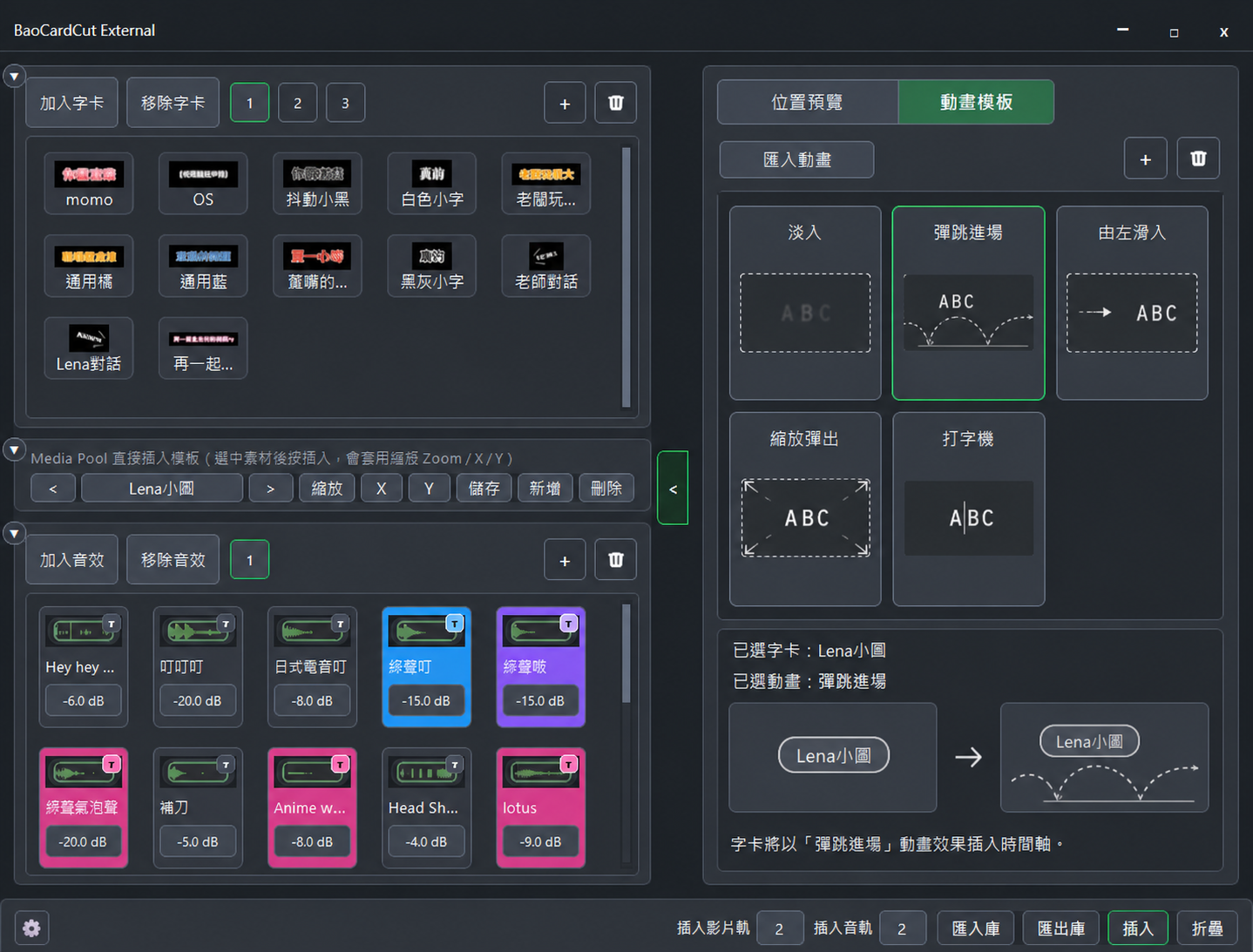
apply animation templates without leaving Better Asset Pool.

Pick a title, pick a saved animation, and insert. Better Asset Pool will apply the animation to the title before placing it on the timeline—similar to the template workflow in modern editing apps. No reopening Template Projects, copying clips, saving Macros, or switching back and forth to the Effects panel.

Buy during the US$44 launch offer: this future animation feature will be included as a free update. After the product returns to US$65, this feature will require a separate paid unlock.
AI-generated animation-template feature concept

AI-generated feature concept. The final interface and interaction details may differ at launch.

FAQ

Questions before you buy

Is Better Asset Pool a cloud asset library?

No. Assets and settings are stored in a folder on your own computer. You do not need to upload client assets to a Better Asset Pool cloud.

Can I use the same assets in another Resolve project?

Yes. That is the core purpose of Better Asset Pool. Once an asset is added, it can be imported into other Resolve projects and Libraries.

Does Windows require installation?

The Windows version is planned as a portable app: extract it and open the application without a traditional installer.

Will macOS be supported?

The macOS version is undergoing final validation and may require a one-time setup. Supported versions and setup steps will be listed clearly at launch.

Is this a subscription?

No. The plan is a one-time purchase: US$65 regular price and US$44 during the launch promotion.

BUILD ONCE. INSERT ANYWHERE.

Stop reopening old projects
just to find one asset.

Turn the titles, animations and sound effects you have already made into a library you can insert at any time in any DaVinci Resolve project.